Register on Abacus Market

Register on Abacus Market (GUIDE)
Guidelines for creating a user account to gain complete access to Abacus Market.
Before you begin the registration procedure, ensure that you are on an authentic URL for Abacus Market. You can verify this by checking the onion address in your URL against the official addresses provided by Abacus:
abacus7ygil56glanhj3oai2gap6pomy5tevunbvv3lbo3jg7zua7yid.onion
abacus7ygil56glanhj3oai2gap6pomy5tevunbvv3lbo3jg7zua7yid.onion
abacus7ygil56glanhj3oai2gap6pomy5tevunbvv3lbo3jg7zua7yid.onion
If the onion address in your URL aligns with one of the approved links to access the Abacus Market, you can confidently move forward with the following instructions.
Step 1 – navigate to the page dedicated to account registration and complete the registration form:
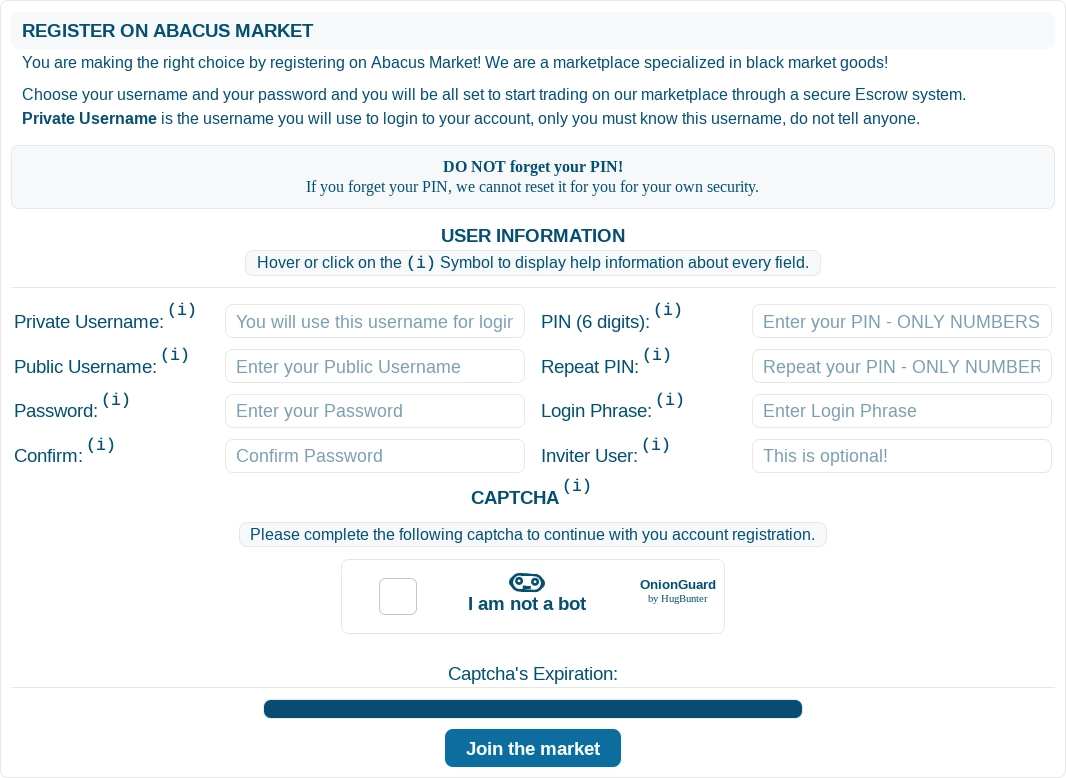
While filling out the form below, ensure you set a secure PIN and store it in a safe location. This PIN is crucial as it will be required to make purchases and withdraw funds from Abacus Market.
Private Username – input the username you intend to use for logging into Abacus Market. Keep this username confidential and do not disclose it to anyone. It must remain private and known only to you.
Keep in mind: This username will be necessary for logging into the market.
Public Username – please provide your public username! This is the name that will be displayed to all users.
Password – create a password for the account you are setting up.
Important: Ensure your password is different from those used on any other marketplaces.
Confirm – repeat the password you have chosen to verify its accuracy.
PIN (6 digits) – enter a 6-digit numeric code. You will need this PIN to confirm any purchases, safeguarding against unauthorized transactions in case your account is compromised. Remember this PIN and never share it with anyone.
Repeat PIN – re-enter your 6-digit PIN for confirmation.
Login Phrase – this is a phrase you will see each time you log in to the market. It's a useful indicator that you are on the actual site rather than a replica. Be aware that it does not protect you against phishing sites. This step is optional.
Inviter User – If someone has invited you to the market, enter their referral code here. This is optional.
Complete the captcha to finalize this stage of the process.
Click the \"Join the market\" button to advance to the next stage.
Step 2 – log in to your newly created Abacus Market account:
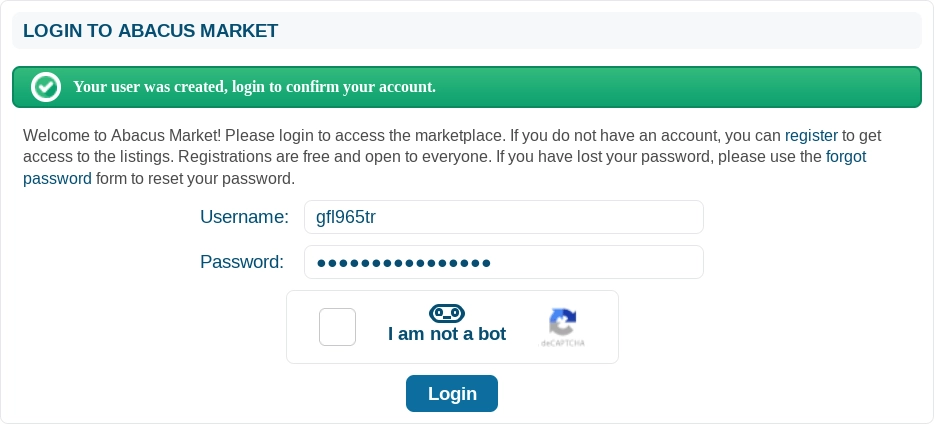
Username – provide the username you registered with Abacus Market.
Password – input the password associated with your account.
Complete the captcha to finalize this stage of the process.
Click the \"Login\" button to proceed further.
Step 3 – preserve the mnemonic code generated for your account.
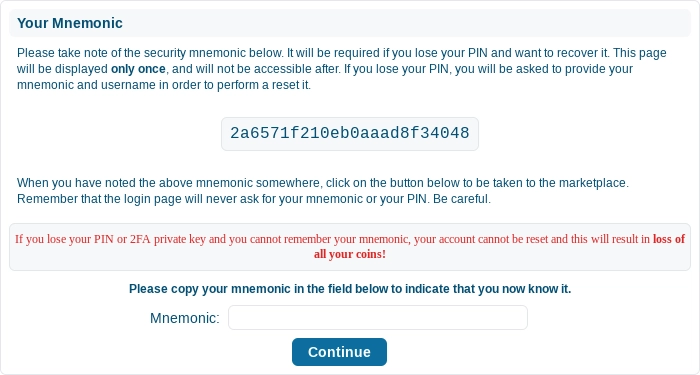
Mnemonic – paste the mnemonic code you have previously saved.
Press the \"Continue\" button to finish the account activation process.
Welcome to Abacus Market!